

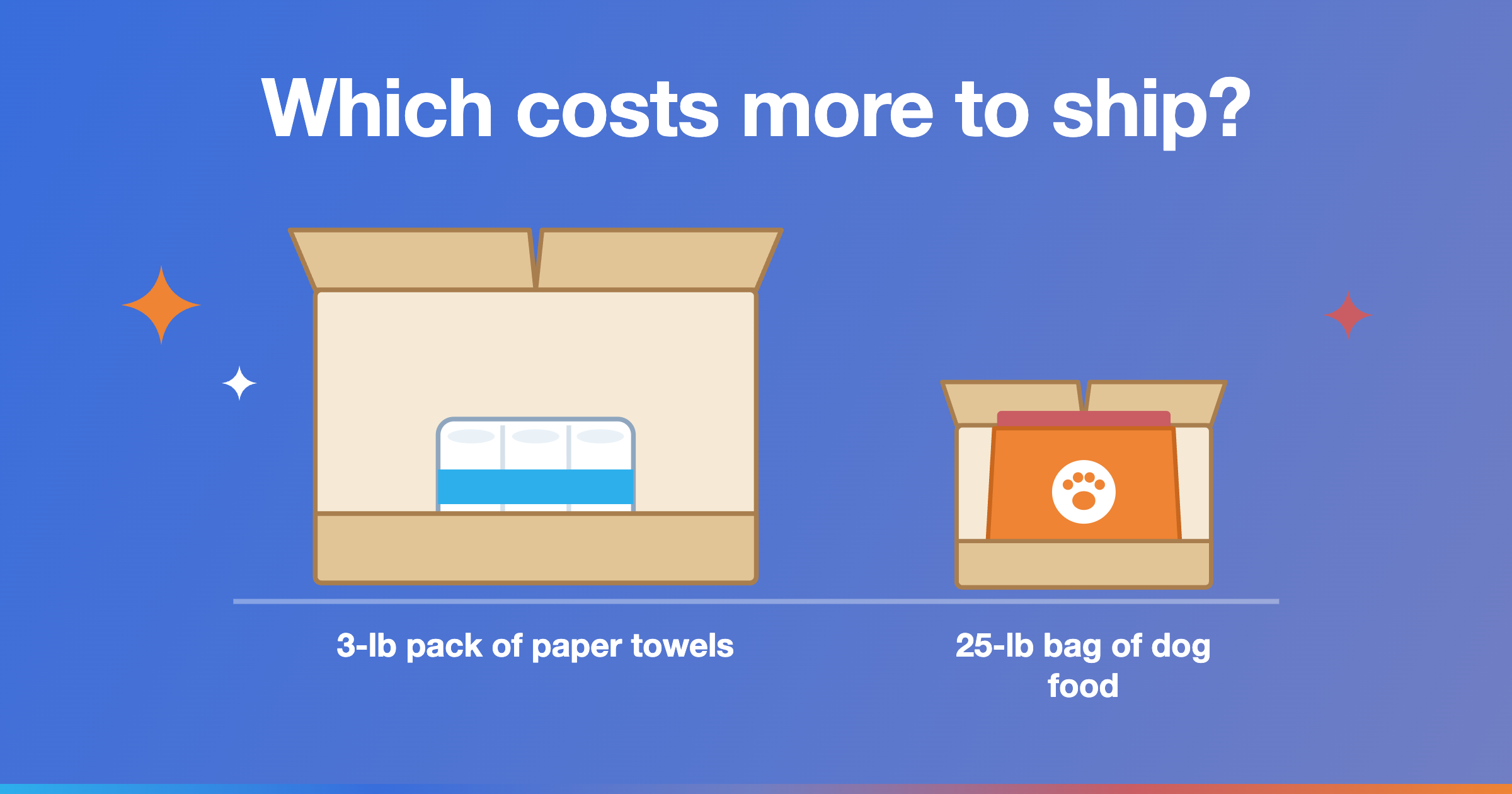
Let’s start with a quick quiz. Which costs more to ship?
- A 12-pack of paper towels or a 25-pound bag of dog food?
- A lampshade or a cast-iron skillet?
- A giant teddy bear or a bowling ball?
If you picked the heavier item each time, you’re not alone. It’s a bit of a trick question: in all three cases, the big, lightweight item can cost more to ship. Sometimes a lot more.
That’s dimensional weight at work. Carriers charge for the space a package takes up, not just its weight. So shipping costs can feel completely backward.
And this isn’t just a problem for lampshade sellers and toy shops. It affects nearly any merchant that ships parcels. Shoppers now buy everything online, from paper towels to dog food to meal kits, and shipping costs play a big role in where they buy. Here’s the part that isn’t a trick question: Shoppers buy from the stores that offer the best shipping options at the right price.
The problem gets harder as your store grows: more products, more sizes, and carts filled with a mix of light, heavy, big, and small items. If your checkout doesn’t know which box each order actually ships in, the rate your customer pays won’t match what your carrier bills you. Either you overcharge and lose the sale, or you undercharge and cover the difference yourself, often without realizing it.
At ShipperHQ, we’ve spent nearly two decades solving merchant shipping problems, and this is one we hear about constantly.
The fix is dimensional packing: automatically rating each order at checkout based on accurate dimensions. Your rates stay accurate, and you decide how to handle dimensional weight charges, instead of finding out on your carrier bill.
Here’s how it works, what it’s costing you, and what to do about it.
Want the quick version first? Watch ShipperHQ solutions engineer Ian Henke break down dimensional packing live and tell you why it matters to your margins. Sign up for the live session.
How Carriers Calculate Dimensional Weight
When carriers decide how much to charge for a package, they look at two numbers.
First, they look at actual weight: what the package weighs on the scale.
Then they look at dimensional (DIM) weight: how much space the package takes up.
To calculate dimensional weight, multiply the package’s length × width × height in inches, then divide by the carrier’s DIM divisor. Round the result up to the next pound, and that’s the dimensional weight.
Whichever is higher—actual or dimensional—becomes that package's billable weight. Carriers then use that billable weight, along with how far the package is going, to set the rate.
In 2026, UPS, FedEx, and USPS all use a divisor of 139 for most domestic business shipments. (UPS uses 166 for retail counter rates. USPS switched from 166 to 139 in July 2026, and it only applies dimensional weight to packages over 1 cubic foot.)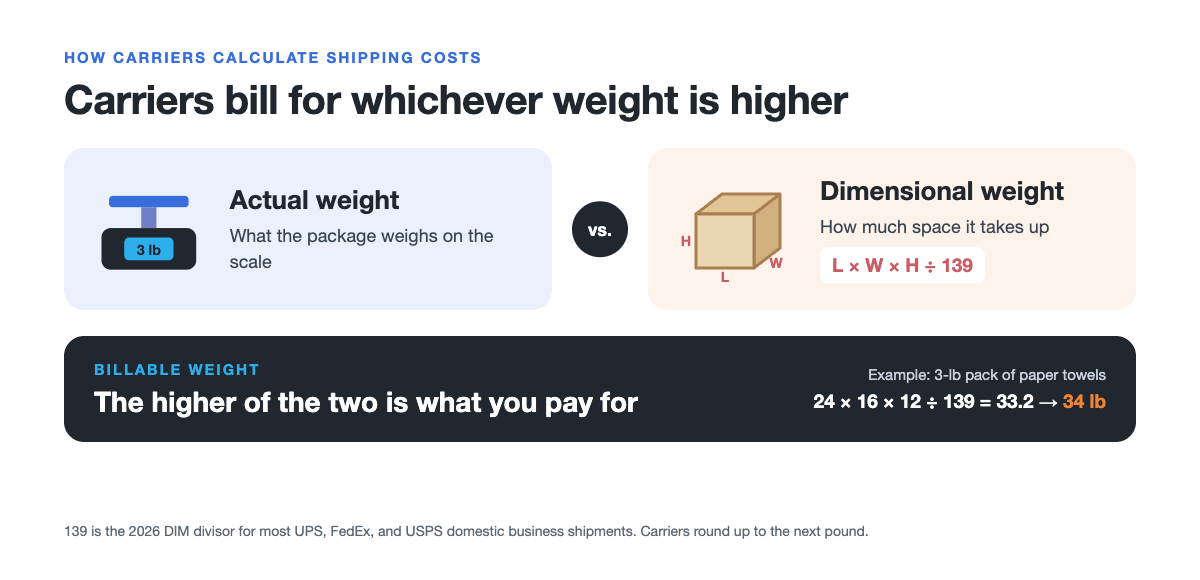 Here’s how that plays out for real merchants and customers.
The paper towels vs. the dog food. A 3-pound 12-pack of paper towels ships in a 24 × 16 × 12 box. That’s 4,608 cubic inches. Divide by 139, and you get 33.2, which rounds up to 34 pounds billable.
The 25-pound bag of dog food ships in a smaller 20 × 14 × 5 box. Its dimensional weight is only 11 pounds, so it bills at its actual weight: 25 pounds.
The paper towels bill at 9 pounds more than the dog food, even though they weigh 22 pounds less.
The teddy bear vs. the bowling ball. Say your niece wants a giant 2-pound plush bear for her birthday. It ships in an 18 × 14 × 12 box: 3,024 ÷ 139 = 21.8, so 22 pounds billable.
A 15-pound bowling ball ships in a 10 × 10 × 10 box. Its dimensional weight is just 8 pounds, so it bills at 15 pounds.
The lampshade vs. the skillet. Same story. A 2-pound lampshade in a 16 × 16 × 14 box bills at 26 pounds, more than three times the 8-pound cast-iron skillet.
You could run the numbers on almost any light, bulky product and get the same result.
So why do carriers bill using dimensional weight?
It can feel unfair to pay more to ship lighter items. But from a carrier’s perspective, it’s simple: Trucks and planes run out of space long before they reach weight capacity. A truck full of teddy bears is full, but it’s light. DIM pricing makes sure carriers get paid for the space a package takes up.
LTL freight carriers have also started using dimensional weight in pricing. For example, the National Motor Freight Traffic Association started shifting freight classification to density-based rather than weight-based last year, and has made more rule adjustments this year that further prioritize density-based pricing over weight-based pricing.
How to Avoid Losing Money Due to Dimensional Weight
Nearly every merchant that ships parcels feels dimensional weight, either as shipping costs they absorb or as sales lost to shipping rates that are too high.
Problem #1: Undercharging costs you margin
This is the more common problem we see.
Let’s go back to the paper towels. Say a 12-pack sells for about $20. It bills at 34 pounds, which (based on current rates as of writing) costs roughly $25 to $68 to ship, depending on how far it’s going. But many checkouts rate orders on actual weight. At 3 pounds, the customer is charged about $13 to $18.
The carrier still bills you for 34 pounds. So on that one order, you lose somewhere between $12 and $50.
It gets worse with promotions. Say you offer free shipping over $50, and a customer buys three 12-packs for $60. That order ships free, and you pay between $75 and $204 to ship it.
On a $60 order. The math gets painful fast.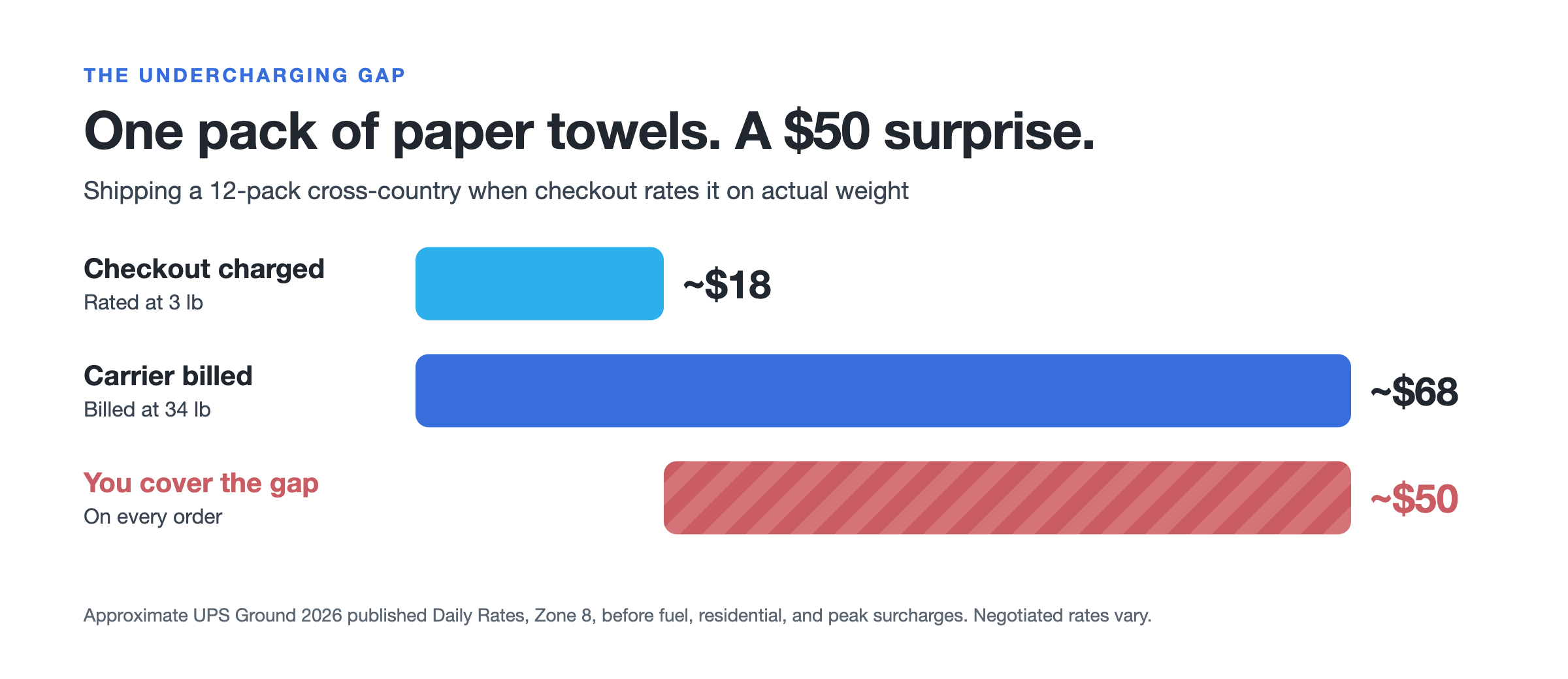
Problem #2: Overcharging costs you sales
The opposite problem can be just as expensive. This stat from Packaging Europe explains it perfectly: 34% of global retailers admit that the packages they use to ship their products in are at least double the size of the actual product inside.
Retailers shipping smaller products like phone cases, toys or jewelry often overcharge for shipping because their products are incorrectly rated and put into a larger box.
Very few shoppers will pay $18 to ship a pair of earrings. They’ll pick them up in store or buy them elsewhere, especially when Amazon Prime members can get free shipping.
Shipping costs are already the top reason shoppers walk away. According to Baymard Institute, 40% of US shoppers who abandoned a checkout said shipping, taxes, or other added costs were too high. An accurate shipping rate can still be a deal-breaker if it’s high.
How to Find Out If Dimensional Weight Is Hurting Your Bottom Line?
Most merchants don’t know they have a dimensional weight problem until they look. Here’s a simple audit you can run this week:
- Pull a sample of recent orders. Grab 50 to 100 orders from the last month or two, including a mix of single-item, multi-item, and larger orders.
- Compare what you charged with what you paid. For each order, line up the shipping amount the customer paid at checkout with what the carrier billed you. Your carrier invoices or shipping software reports will have the billed amounts.
- Look for adjustments. Carriers often flag dimensional weight corrections on invoices. If you see frequent adjustments, your checkout rates aren’t reflecting your real packages.
- Look for patterns. Gaps usually cluster around a few order types: bulky or lightweight products, multi-item orders, holiday bundles and promotions, and orders that ship in more than one box.
- Do the math on the gap. Multiply your average gap per affected order by the number of those orders you ship in a year. That’s what dimensional weight is costing you.
How to Reduce Dimensional Weight Charges
If you’re feeling a bit defeated right now, that’s understandable.
A carrier rate is a carrier rate. Most small and midsize shops can’t call UPS or FedEx and ask them to charge less. So how do you make sure you’re not losing money or sales when you ship big, bulky, or multi-item orders?
It starts with visibility. You can’t manage what you can’t see.
Undercharging and overcharging stem from the same root cause: your checkout doesn’t know how your orders are actually packed, so it guesses. And that guess costs you money.
You can’t control what carriers charge. But over the years, we’ve learned there’s a lot you can control to bring your costs down. Some fixes are about packaging. Others are about checkout. Most merchants need a bit of both.
Right-size your boxes
Look at your most common orders and make sure you have boxes that fit them snugly. A box that’s a few inches smaller on each side can drop several pounds of billable weight. (As a side note, USPS only applies dimensional weight to packages over 1 cubic foot, so keeping boxes under that size can make a difference for USPS shipments.)
Take those paper towels. Switch from a 24 × 16 × 12 box to a 20 × 16 × 12 box, and billable weight drops from 34 pounds to 28. That saves roughly $3 to $10 per order with UPS Ground. Across a few thousand orders a year, that’s real money.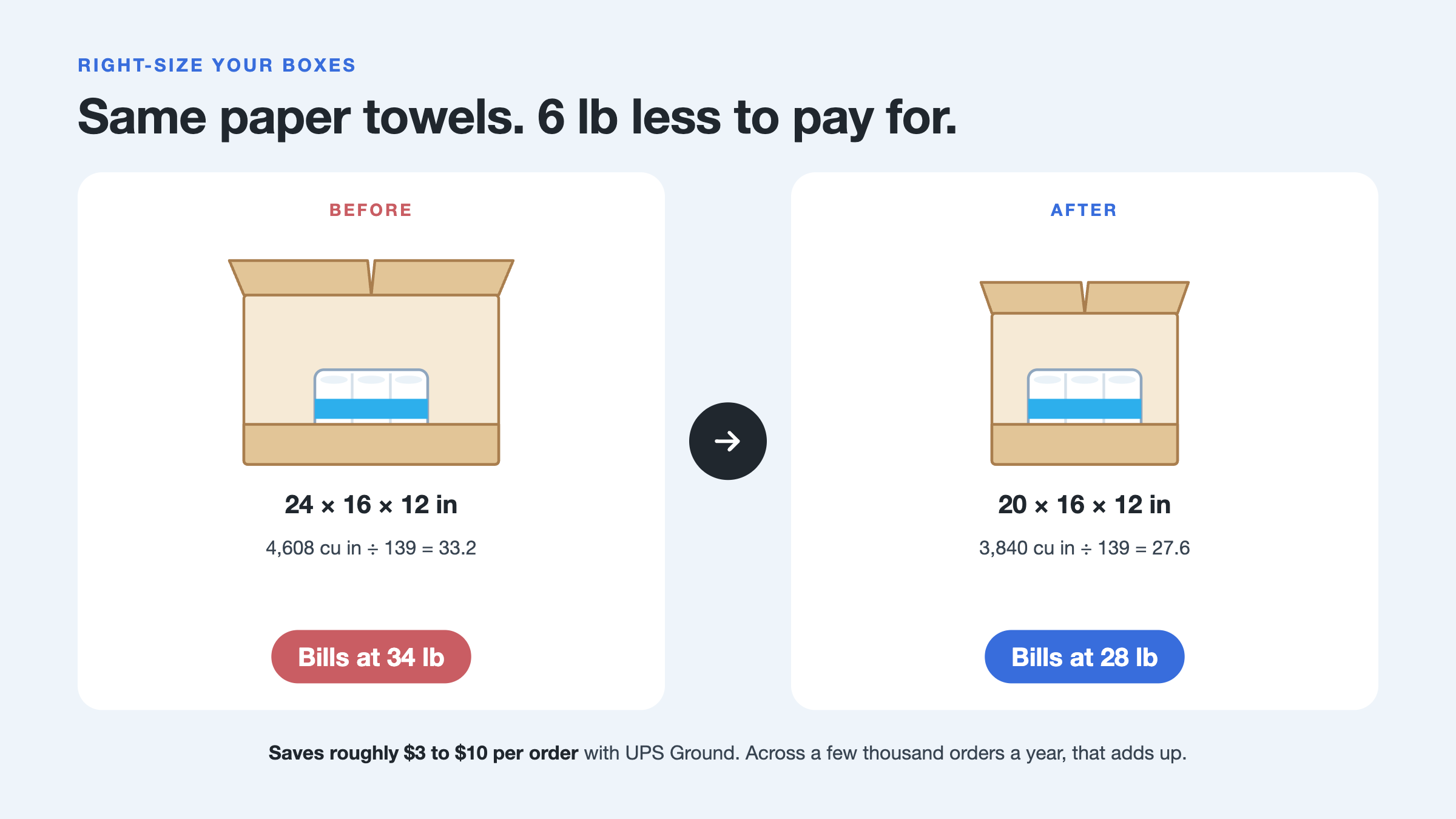
Tips to Stop Losing Money on Dimensional Weight
Tip 1: Add accurate product dimensions
Your checkout can’t calculate the right box if it doesn’t know how big your products are. Make sure every product you ship has accurate length, width, height, and weight.
Tip 2: Set packing rules for products that pack differently
Not every product fits in the smallest box. Some always ship on their own. Some always ship in a fixed set of boxes, like a table that ships as a tabletop plus two boxes of legs. Some always ship together, like wine that goes nine bottles to a case. Packing rules make sure your checkout rates match how those products actually ship.
Tip 3: Account for padding and box limits
Packing material, inserts, and dry ice add weight and take up space. Setting padding and weight or quantity limits per box keeps your rates honest.
Tip 4: Use pallets and freight for big orders
When an order is too big or heavy for parcel, rating it as six or seven parcel boxes can cost far more than a single pallet. Pallet packing with live LTL freight rates gives large orders an accurate, often lower, rate.
If you’re now feeling a bit overwhelmed, we get it.
These steps can make a big difference in billable weight and shipping costs, but they take time. Figuring out the best box for one product takes a few minutes. Multiply that across your whole catalog, then add every possible combination of multi-item orders, and it quickly becomes impossible to manage by hand.
That’s where dimensional packing tools come in. They automate the process, so your checkout knows which box (or boxes) each order will ship in, and your rates reflect what you’ll actually pay.
And once you know the real cost, you’re in control. Take those paper towels again. You could:
- Lower the rate your customer sees and absorb part of the cost, so shoppers don’t bail
- Set a free shipping threshold that makes sense for bulky items
- Rethink the packaging for your bulkiest products
- Charge the full rate and protect your margin
The point is, once you know how your orders are packed, you decide how to handle shipping costs, instead of your carrier bill deciding for you.
How ShipperHQ’s Dimensional Packing Works
ShipperHQ has been building and refining Dimensional Packing for over a decade, based on feedback from thousands of merchants. The idea is simple: it packs each order at checkout the way your warehouse actually does, so the rate your customer sees matches what the carrier bills you.
Here’s what that means:
- Best-fit boxes, including multiple boxes. ShipperHQ fits items into the best boxes for each order and splits into multiple boxes when needed, so a two-box order is rated as two boxes.
- Dimensional rates, even without saved boxes. If you haven’t set up your boxes yet, ShipperHQ can still calculate dimensions based on your products.
- Packing rules. Ship items individually, in a fixed set of boxes, or together in a master box.
- Box controls. Assign boxes to specific products, set weight and quantity limits, and add padding or packing material.
- Pallet packing for freight. Oversized and heavy orders are packed onto pallets for live LTL freight rates.
What Dimensional Packing Looks Like in Practice
Eagle Mountain Flag sells patented flagpoles and flag hardware. Its catalog of 27,000+ SKUs ranges from small flags to giant multi-section flagpoles, making accurate shipping rates tricky.
When the team tried a lower-cost shipping app, it couldn’t properly size and rate their packages. Cart abandonment jumped more than 30%, and undercharged orders were costing them nearly $1,000 a month.
So they came back to ShipperHQ. Our Dimensional Packing feature calculates precise rates for every item or combination of items, including mixed carts with flagpole sections and small hardware. Within a couple of weeks, cart abandonment dropped 30%, and they recovered nearly $1,000 a month in lost margin.
Native Dimensional Packing vs. a Dedicated Tool
Dimensional weight is an expensive problem, so more platforms are starting to better account for it in shipping rates at checkout. Shopify, for example, recently updated the way it handles package selection to better support multi-item orders.
We’re all for it! It’s a real step forward for checkout accuracy, and for many smaller stores—or stores just getting started—native tools can handle a lot of orders.
There’s just one catch. Native tools work well for simple orders, but as stores grow, their orders get more complex. Some need more than one box, some need padding or separate shipments, and some go out on pallets. Native tools aren’t built to flex for all of that, so rates drift from what shipping actually costs, and merchants end up undercharging. That’s usually when they call us.
Do you need more than native? Our checklist can help you to determine what your store needs.
At a Glance: How Shopify Handles Package Selection vs. How ShipperHQ Handles It
|
Shopify native |
ShipperHQ Dimensional Packing |
|
|
Multi-item orders |
Picks the smallest saved box that fits the order. |
Fits items into the fewest, smallest boxes for each order. |
|
Orders that need more than one box |
Rates using your default box or a single saved box |
Splits into multiple boxes and rates each one |
|
When no saved box fits |
Falls back to your default box |
Compares product volume against available boxes. If items do not fit into the defined boxes, it generates a custom box. Depending on your configuration, items may be split across multiple available boxes. |
|
Without saved boxes |
No dimensional rating |
Calculates dimensions from your product sizes |
|
Product setup for live carrier rates |
Every product in the shipment needs a packed size, or saved boxes aren’t used |
Uses the standard product dimensions set in your ecommerce platform, without requiring additional packed sizes |
|
Packing rules (ship separately, fixed sets of boxes, master cases) |
Not available |
Supported |
|
Box limits (weight and quantity per box) |
Not available |
Supported |
|
Padding, tolerance, and packing material (like dry ice) |
Not available |
Supported |
|
Pallet packing for LTL freight |
Not available |
Supported, with live rates from 30+ LTL carriers |
|
Checkout-to-fulfillment handoff |
Package chosen at checkout is pre-selected when you buy the label in Shopify |
Sends order details to your OMS, WMS, or TMS, including the boxes selected and which items go in each one |
|
Cost |
Included with Shopify |
Included in all ShipperHQ plans |
|
Best for |
Simple catalogs and orders that fit one box |
Diverse catalogs, multi-box orders, bulky items, and freight |
Comparison as of November 2026, based on Shopify’s multi-item package selection released September 29, 2026. Features may change.
The Bottom Line on Dimensional Weight
Dimensional weight isn’t going away. In fact, carriers are shifting toward it more each year as rules change. Carriers will keep charging for the space your packages take up, and as your catalog grows, more orders will be affected.
But it doesn’t have to cost you thousands. When your checkout knows exactly how each order gets packed, your rates match your carrier bill. You stop quietly losing margin on bulky orders, stop scaring off shoppers with inflated rates, and decide how to handle shipping costs on your terms.
Start by running the audit above to see where you stand. Then use the checklist below to decide whether your current setup is enough.
Is Native Enough? Take the Checklist
Not sure whether a native tool is enough for your store? Our Do You Need More Than Native checklist walks you through the questions that matter.
Want a second set of eyes? Book time with one of our shipping experts, and we’ll walk through your setup with you, no strings attached.
Dimensional Weight, Explained
That’s the full picture on dimensional weight: how carriers calculate it, what it really costs, and what you can do about it.
The short version? Box size matters more than most merchants think, and a checkout that knows exactly how your orders get packed can save you a lot of money and a lot of lost sales.
If you’re not sure where to start, grab the checklist, or book a quick walkthrough with one of our shipping experts.
We’re always happy to talk boxes.
Give Shoppers the Choice.
Keep the Margin.
ShipperHQ compares live rates across your carriers and shows shoppers their options, whether that's cheapest, fastest, or both.