

Maya orders coffee beans every few weeks from a small roaster in Portland. The first time she checked out, she saw the standard options: ground shipping for $6.95, or expedited for $14. Nothing special.
But the roaster had configured its checkout around how it actually fulfills orders. Instead of seeing "Ground Shipping (3–7 business days)," Maya saw "Arrives Thursday, Oct 8." A real date, not a vague range.
The store also offered free shipping once an order reached a certain value. When Maya was close to the threshold, the cart let her know she could add one more bag to qualify. She added it.
Ordering got easier in other small ways too. Maya used her saved office address, and the roaster's delivery calendar skipped weekends when nobody would be there to receive the box. When a holiday fell on a Monday, the earliest available delivery date moved to Tuesday instead of promising a date the store couldn't keep.
Maya never thought about any of this. She just noticed that ordering from this roaster felt easier than ordering from sites where she had to guess at delivery windows or wonder when her package would actually arrive.
That lack of friction is the point. Personalizing the shipping experience means giving shoppers options that fit their order and needs while accounting for how you actually fulfill and deliver it.
Here's why that matters. 90% of shoppers say the shipping experience makes up at least half of their overall online shopping experience.
This guide walks through each stage. First, plan around what your customers and products need. Next, make sure your checkout is clear and priced correctly. Then personalize the unboxing experience and follow through on the delivery promise.
Plan the Shipping Experience Before the Order Is Placed
A good shipping experience is planned before a shopper ever reaches checkout. Start by asking yourself two questions:
- What do your customers value?
- What special requirements do your products have?
Know What Your Customers Value
Your checkout data already tells you a lot about what customers want. Look at which shipping methods they choose most, whether they lean toward cheaper or faster options, how often they use free shipping when it's offered, and how all of that varies by region or seasonality.
ShipperHQ's Shipping Analytics puts those numbers in one dashboard. You can see your top selected shipping methods, cost-based vs. speed-based choices, conversion rate, and what you collect for shipping vs. what it costs you. Then filter by region, time period, cart price, or cart weight to see how different orders behave.
You'll usually see a few clear groups. Some customers care most about price. Some care about speed. Others need an order on a specific day, or would rather pick it up nearby. Plan your shipping options around those groups instead of trying to please every individual shopper.
Special Requirements Your Products Have
Your catalog shapes the experience too. A bulky item may need freight or a special delivery service. Perishables may need faster shipping. Birthday gifts often need to arrive by a certain date, and fragile items need extra protection. It's worth taking the time to map these needs out early, because they decide which options you can realistically offer.
Make Sure Your Checkout Details like Price and Delivery Date are Clear
Checkout is where your shipping experience becomes real for the shopper. Shoppers want to clearly see what shipping will cost, and what their delivery options are.
Show Accurate Shipping Costs Up Front
Nothing makes a shopper abandon cart faster than an unexpected shipping expense.. When the shipping price jumps at the last step, or doesn't match the free shipping banner, shoppers lose trust and often leave. Displaying accurate rates can also protect you from the opposite problem: undercharging for shipping and quietly losing margin on every order.
Showing accurate rates based on what's actually in the cart and where it's going can be a bit complex, but features like Shipping Rules or Dimensional Packing can make it simple and automated. Showing shipping costs and delivery dates on the product page can help too, so the price never comes as a shock.
Match Shipping Options to the Products in the Cart
Not every shipping option works for every order. A bulky product may need different services than a small parcel. Local delivery only makes sense within a certain area. An item shipping from another warehouse may have a different delivery timeline.
Shipping Rules can automate which options appear for each cart, based on the products, the destination, where the order ships from, and any delivery requirements. Shoppers only see choices you can actually deliver on, which can really help you optimize the checkout experience for your customers.
Let Customers Choose How and When It Arrives
Once the options fit the order, give shoppers control over how they receive it. You can personalize the shipping options at checkout with delivery dates, pickup options, and local delivery time slots.
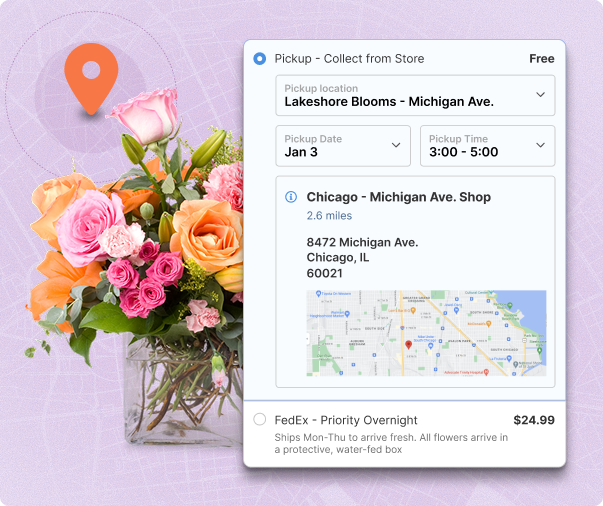
Ways to Give Your Customers More Control of Delivery Options
- Scheduled Deliveries: Scheduled delivery lets the customer choose an available delivery date from a calendar at checkout, instead of simply receiving an estimated range. For local delivery, merchants can also offer available time slots. That's a real advantage, because 58% of shoppers want to see an exact delivery date before they buy, but only 1% of ecommerce brands show one.
- Expedited or Overnight Shipping: Offering expedited services next to standard ground shipping gives time-sensitive customers a clear choice between speed and cost. Accurate rates for each method help them assess the trade-offs at checkout.
- Local Store Pickup: In-store pickup lets customers collect orders on their own schedule, often sooner than home delivery and often without a shipping fee. At checkout, shoppers can choose the pickup location and date. Gertrude Hawk Chocolates recovered 30% of sales with in-store pickup.
Your delivery strategy gets the order to the door, but the unboxing is what customers remember. It's also one of the easiest places to show your brand's personality.
How to Customize Your Boxes to Fit Your Brand
The box your product arrives in can make (or break) the unboxing experience. This is the first thing your customer sees when your product arrives and is an important part of the personalization process.
Start with The Right Box Size
Packing gets trickier when an order has more than one item. Fitting everything into one box may be the cheapest option, or it may not. A single large box can cost more than two smaller ones once carriers apply dimensional weight, which rates a package by its size as well as its weight. And some items shouldn't share a box at all, like fragile products, items shipping from another warehouse or products that come pre-packed.
That decision belongs in your shipping logic, before the order ever reaches your packing team. ShipperHQ's best-fit packing looks at product dimensions, weight, quantity, box sizes and your packing rules to find the most efficient way to pack each order. You can also mark items to ship separately, in multiple boxes or in fixed-quantity master cases, so the rate at checkout matches how the order actually ships.
A box that fits the product protects it better, looks more polished, and (bonus!) usually costs less to ship than a bigger box packed with filler. When you switch to custom or branded boxes, set up those box sizes in your shipping software so the rates at checkout reflect the boxes you actually ship in. You can even account for the weight of packing materials and inserts.
Include Branded Materials and Personal Touches
Branded boxes, custom tissue paper and printed tape turn a plain package into part of your brand. They don't have to be expensive. Even a stamped logo or a branded sticker on a standard box makes the delivery feel like it came straight from you.
What goes inside the box can bring customers back. Here are a few ideas that work for most ecommerce merchants.
- A thank-you note. A short handwritten or printed note makes the order feel personal, especially with the customer's first name on it.
- A discount for the next order. A code for their next purchase gives customers a reason to come back soon.
- Product samples. A sample of a related product introduces customers to more of your catalog.
- A helpful insert. Care instructions, how-to tips or a quick-start guide help customers get more out of what they bought.
- An invitation to share. Ask customers to post their unboxing or leave a review.
Cut Post-Purchase Support Tickets With a Delivery Date You Can Keep
You've set expectations at checkout and packed the order with care. Now the order has to arrive when you said it would.
This is where the delivery date you showed at checkout keeps paying off. When shoppers know exactly when an order will arrive, they don't need to contact your team to ask "Where is my order?" Those tickets drop, and your support team gets time back for questions that actually need a person.
Clean Eatz Kitchen saw a 100% reduction in customer service tickets about delivery dates after adding delivery date transparency with ShipperHQ. As CEO Jason Nista put it, "Our customers no longer have a guessing game as to when an order is going to be delivered."
A delivery date only helps if you keep it. Build a buffer into your lead times, and use your carrier tracking and email or SMS tools to tell customers early if a date changes.
Put the Right Shipping Logic Behind Your Ecommerce Shipping Experience
Every stage of this guide depends on getting the order details right. Checkout has to show the right price, the right options and a delivery date you can keep. Basic platform shipping settings often stop short of that level of control.
A shipping management solution like ShipperHQ applies your rules to each cart based on the products, destination, origin and carrier. With features like Enhanced Checkout, you can show delivery options that fit the order and display accurate rates and delivery dates, all without writing code.
ShipperHQ makes sure the checkout that starts the whole experience is clear, accurate, and built around the order.
When checkout is clear, the box feels personal and delivery goes smoothly, customers like Maya notice. And they come back. Again and again.
See Enhanced Checkout in action. Book a demo.